
escrcpy
Graphical Android device mirroring and control with scrcpy
Replaces Vysor, Airdroid Cast, Apowermirror
Who it's for
Mirror the device directly to the desktop during development and demos without a USB handoff or audience crowding around a phone. The integrated control sidebar handles rotation, screenshots, and app navigation without switching windows.
If you are testing on an emulator rather than a physical device, Android Studio's built-in emulator handles this without additional tooling.
Multi-device management lets you connect, mirror, and issue commands to multiple devices simultaneously from a single window. Batch APK installs and batch screenshots reduce the manual work of provisioning or auditing a device fleet.
If your fleet management needs extend to MDM policies, remote wipe, or app policy enforcement, escrcpy covers mirroring and manual control only; a dedicated MDM tool is needed alongside it.
Keyboard mapping lets you bind physical keys and joystick inputs to touch regions on the mirrored screen, making Android games playable from the desktop. The scrcpy engine underneath keeps input latency low for responsive gameplay.
If a game uses anti-cheat software that detects ADB connections or developer mode on the device, escrcpy will trigger that detection and the session may be blocked.
The visual automation script builder chains device interactions with screen image recognition triggers. Batch execution runs the same script across all connected devices, making it useful for provisioning, testing, or repetitive content workflows.
If your automation needs are simple one-off tasks, the overhead of building a visual script is unnecessary; direct keyboard mapping is faster for most quick interactions.
The problem
Controlling an Android device from a desktop normally means choosing between paid commercial tools or wrestling with raw ADB commands. Paid options require subscriptions for full access. The best free technical alternative, scrcpy, has no graphical interface: every session requires typing command-line flags, tracking device IDs, and managing ADB connections manually. For developers who mirror devices daily or IT teams managing multiple Android devices, that command-line friction adds up. The gap between scrcpy's technical strength and its usability is where most teams end up compromising on tooling.
How it works
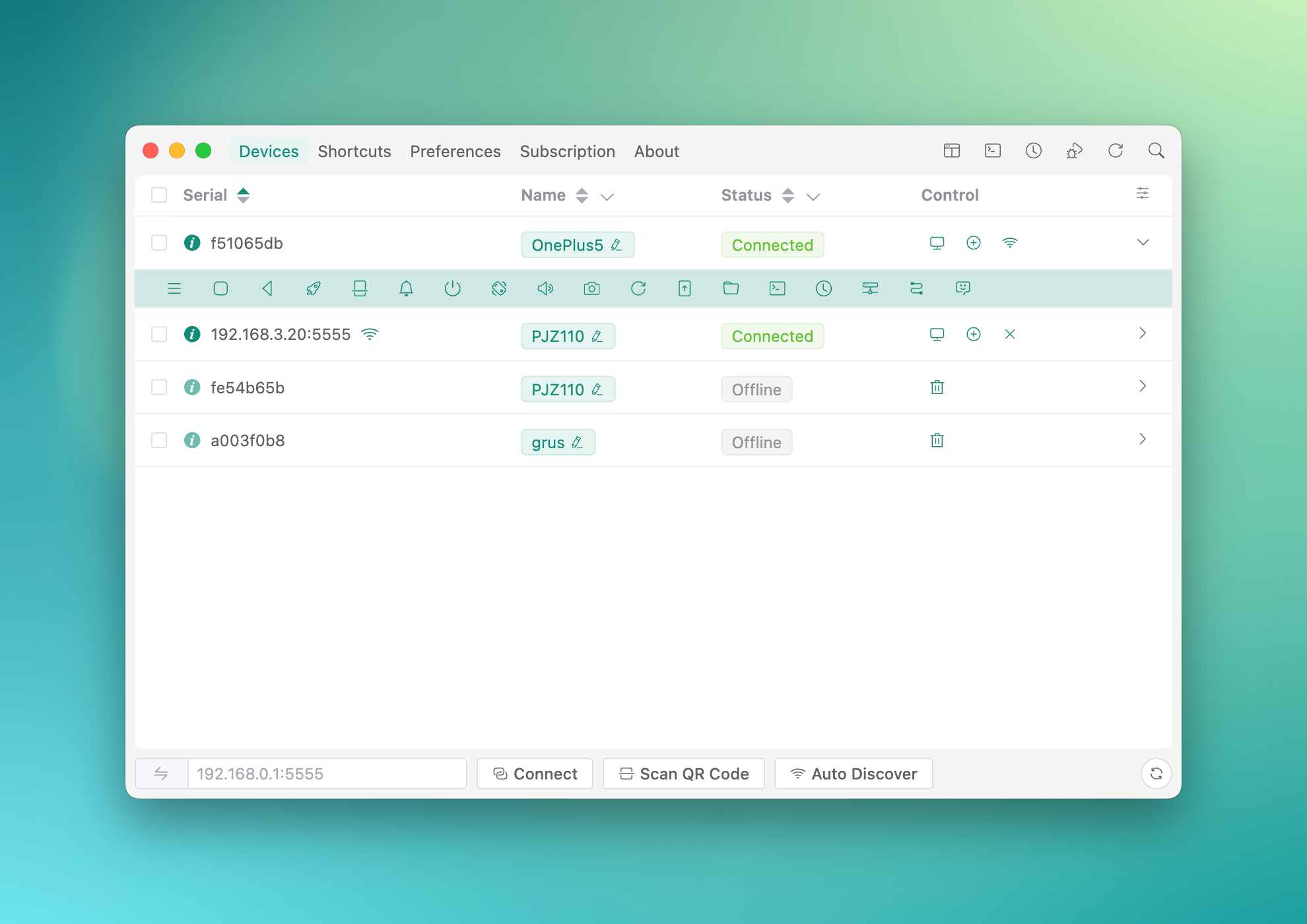
A dedicated embedded mirror window that auto-fits screen resolution and orientation changes. One-tap shortcuts are built directly into the mirror overlay, removing the need to switch between control panels while interacting with the device.
Manage multiple Android devices simultaneously from a single window. Broadcast keyboard and touch input to all connected devices at once, take batch screenshots across the fleet, or install APKs on multiple devices in one operation.
Map keyboard keys, joystick axes, swipe gestures, scroll events, and automation triggers directly onto the mirror view. Useful for gaming, testing apps with physical controller input, and scripting repetitive device interactions without leaving the desktop.
Connect to Android devices over Wi-Fi using ADB's wireless mode. LAN auto-discovery finds devices on the local network without manually entering IP addresses. Gnirehtet reverse tethering lets a connected device share the desktop's internet connection.
An AI assistant built on the MCP protocol that accepts natural-language commands to control the connected Android device. Supports multiple AI model providers for the chat backend, letting you choose the model that fits your workflow.
A step-by-step workflow builder that chains device interactions using screen image recognition to trigger actions based on what appears on screen. Supports batch execution across all connected devices for fleet-wide automation.
Features
- Inset Mirror Window
- Multi-Device Control
- Keyboard and Input Mapping
- Wireless ADB with LAN Discovery
- AI Copilot
- Visual Automation Scripts
Recommended for this setup
Strengths
- Built on scrcpy's proven mirroring engine: scrcpy, built by Genymobile and acknowledged in escrcpy's README, provides high-performance, low-latency Android screen mirroring. escrcpy inherits that core engine and layers a full graphical interface on top without sacrificing the underlying performance that makes scrcpy the reference tool in this space.
- No cloud dependency, no account required: All mirroring and control traffic travels over a direct USB or local network ADB connection. No account registration is needed. The core open source release covers mirroring, multi-device control, keyboard mapping, and automation at no cost; only the optional EscrcpyX extension adds a paid tier.
- Cross-platform on Windows, macOS, and Linux: Release packages are available for all three major desktop operating systems. macOS users can also install via the Homebrew tap at viarotel-org/homebrew-escrcpy. A consistent interface across platforms lets mixed-OS teams standardize on one Android management tool.
- Apache-2.0 license for commercial use: Apache-2.0 grants broad rights: run escrcpy in a commercial environment, modify the source, and redistribute it without copyleft restrictions. Teams do not need to evaluate license compatibility the way they would with GPL or AGPL projects.
Trade-offs
- Some advanced features require the paid EscrcpyX extension: The README states that escrcpy focuses on a stable open source foundation and that some advanced features come from EscrcpyX, a private extension repository offered on a paid basis. The free release is fully functional for standard mirroring and control, but a feature ceiling is kept behind an optional paid layer.
- Requires ADB setup on the host machine: ADB must be installed on the desktop and the Android device must have USB debugging enabled before escrcpy can connect. This is the same prerequisite as raw scrcpy, but it adds a setup step that some commercial tools handle more automatically for non-technical users.
- Support is limited and updates are irregular: The README states explicitly that support is limited and updates are irregular, as this is a passion-driven open source project. Users who encounter edge cases should expect to rely on the GitHub Issues tracker rather than dedicated support channels. The project is actively maintained but response time varies.
Tech stack
FAQ
Yes. The core application is open source under Apache-2.0 and free to use with no subscription. Some advanced features are part of EscrcpyX, a private paid extension, but the open source release covers mirroring, multi-device control, wireless ADB, keyboard mapping, and automation scripts at no cost.
Yes. escrcpy supports wireless ADB connections with LAN auto-discovery, which finds and connects to Android devices on the same local network without manually entering IP addresses. It also supports Gnirehtet reverse tethering, which lets a connected Android device share the desktop's internet connection over the same ADB session.
scrcpy is an open source Android mirroring and control tool built by Genymobile. It is the performance engine underneath escrcpy. escrcpy wraps scrcpy's command-line interface in a graphical desktop application, adding multi-device management, keyboard mapping, wireless ADB discovery, an AI copilot, and visual automation scripts on top of scrcpy's core mirroring capabilities.
escrcpy is free and Apache-2.0 licensed; Vysor and AirDroid Cast are proprietary commercial products that require payment for full access. escrcpy connects to devices locally via ADB with no cloud relay required for mirroring. It also offers advanced features including multi-device simultaneous control, keyboard and input mapping, and visual automation scripts.
Windows, macOS, and Linux. Release packages for each platform are available on the GitHub Releases page. macOS users can also install via the Homebrew tap maintained at viarotel-org/homebrew-escrcpy. The application is built on Electron and Vue, which enables a consistent cross-platform experience.