
auto-subs
Local-first AI subtitles for DaVinci Resolve and Premiere Pro.
Replaces Submagic, Veed Io, Happy Scribe, Rev Com, Kapwing
Who it's for
Editors producing interviews, documentaries, or tutorial videos can transcribe a full timeline in minutes, then push styled subtitles directly into DaVinci Resolve or Premiere Pro without leaving the editing environment. Speaker diarization labels each voice separately so subtitles can be styled per speaker.
If your workflow is entirely browser-based and you do not use a desktop NLE, AutoSubs has no browser component to connect to.
Creators who produce multilingual content can pick specialist models for their language: GigaAM for Russian, Moonshine for Arabic, Chinese, Japanese, and Korean, or Canary for European languages. This avoids the accuracy drop that general models show on non-English audio.
If you only produce English-language content and prefer to avoid installing desktop software, a managed cloud subtitle service will be simpler to start with.
Journalists, legal professionals, or corporate video producers working with footage that cannot leave the building can transcribe and subtitle entirely on their own machine. No account is required, no footage is uploaded, and no third-party service processes the audio.
If your footage is not sensitive and you prefer a fully managed service with no local setup, cloud subtitle tools will be simpler to operate.
AutoSubs exposes a CLI for command-line usage, making it scriptable as part of automated video processing pipelines. The MIT license allows commercial integration without restriction, and all transcription runs offline so pipelines do not depend on external API uptime.
If you need a REST API or server-side transcription service rather than a desktop tool, AutoSubs is not the right fit. A self-hosted Whisper API server is a better match for that use case.
The problem
Adding subtitles to video is one of the most time-consuming parts of post-production. Manual captioning requires transcribing every spoken word by hand and syncing timestamps frame by frame. Automated cloud services like VEED.IO, Happy Scribe, and Rev.com speed up the process, but they come with recurring subscription or per-minute fees, and your footage must leave your machine to be processed on their servers. For creators working with sensitive content, or anyone who cannot afford ongoing SaaS fees, cloud-based subtitle tools present a real challenge. Many video editors using DaVinci Resolve or Adobe Premiere Pro face a broken workflow: they export a clip, upload it to a web app, download the SRT file, and manually re-import it. That round-trip adds friction to every revision and disconnects the captioning step from the editing timeline where it belongs.
How it works
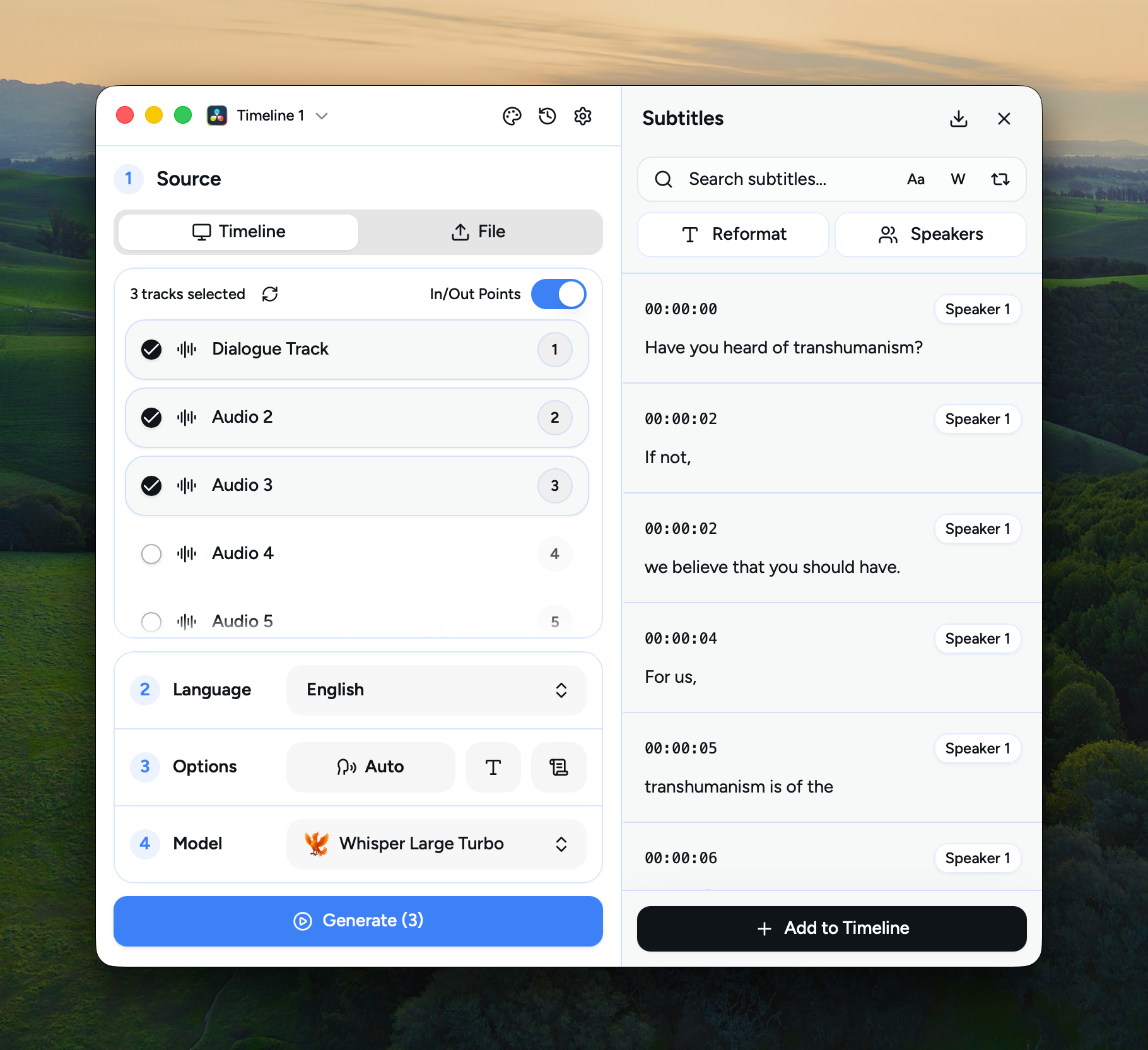
Runs Whisper, Moonshine, Parakeet, SenseVoice, Canary, Cohere, and GigaAM models entirely on your machine using whisper-rs and ONNX Runtime. No audio or video is sent to external servers. Models are downloaded on demand from the in-app Model Manager.
Connects natively to DaVinci Resolve, Adobe Premiere Pro, and After Effects. In Resolve, subtitles are written back to your timeline as styled text. In Premiere Pro, they appear as caption tracks; in After Effects, as SRT-sourced text layers.
Identifies and labels different speakers automatically, letting you style each speaker's subtitles independently. The diarization model (approximately 40 MB) is downloaded separately and user-selectable from the Model Manager, alongside a Silero VAD model for voice activity detection.
Supports transcription across 100+ languages and can translate content into other languages in the same pass. Coverage depends on the chosen model: Whisper large-v3 covers the broadest multilingual range; specialist models like GigaAM handle Russian and Central Asian languages that general models handle poorly.
Runs on macOS (Apple Silicon and Intel), Windows (via Vulkan and DirectML), and Linux (Debian/Ubuntu and Fedora/openSUSE). Install via native package installers or Homebrew on macOS. A CLI is also available for command-line and scripted workflows.
Create custom subtitle styles with color and effects presets, or choose from included templates. Speaker diarization lets you apply a distinct visual style to each detected speaker in the same video, so viewers can follow who is speaking at a glance.
Features
- On-device AI transcription
- Direct NLE integration
- Speaker diarization
- 100+ language transcription and translation
- Cross-platform desktop app
- Customizable subtitle styles
How to install
Install AutoSubs on macOS using Homebrew.
brew install --cask auto-subsRecommended for this setup
Strengths
- No cloud dependency: footage stays on your machine: All transcription models run locally via whisper-rs and ONNX Runtime. Your footage is never uploaded to a server. Unlike VEED.IO, Happy Scribe, or Rev.com, AutoSubs processes video privately on your own hardware, with no account required and no per-minute billing.
- Native timeline integration with DaVinci Resolve and Premiere Pro: Unlike standalone subtitle apps, AutoSubs writes results directly back to your editing timeline. Styled subtitles appear in Resolve or Premiere Pro without a manual SRT import step, keeping the captioning workflow inside your existing editing environment.
- MIT licensed with no subscription fee: The core application is MIT licensed. Once installed, there is no subscription, no usage cap, and no per-video fee. You can use it commercially without restriction. The only exception is the optional MMS forced-alignment weights, which carry a CC BY-NC 4.0 license for noncommercial use only.
- Wide model selection with on-demand downloads: The in-app Model Manager lets you download any of seven model families (Whisper, Moonshine, Parakeet, SenseVoice, Canary, Cohere, GigaAM) at the size that matches your hardware. A 60 MB Moonshine tiny model works on a 1 GB RAM device; a 3.1 GB Whisper large-v3 delivers top accuracy on a more capable machine.
Trade-offs
- Larger models require significant RAM: Accuracy and memory requirements scale together. Whisper large-v3 needs approximately 10 GB of RAM; the large-v3-turbo variant needs 6 GB. On devices with 4 GB or less, you are limited to smaller models (tiny, base) with lower accuracy. This makes AutoSubs less practical on low-spec machines.
- 235 open GitHub issues: The repository has 235 open issues, which is high relative to its 259 forks. This suggests either a fast-growing user base filing bugs and feature requests, or rough edges in specific workflows. Review the issue tracker before depending on less common features or edge-case language support.
- Integration constraints with DaVinci Resolve and Adobe apps: The DaVinci Resolve integration requires the Blackmagic Design installer, not the Mac App Store version. The Adobe integration works via a bundled CEP extension and supports only Premiere Pro and After Effects, not other Adobe apps.
Tech stack
FAQ
Yes. AutoSubs is MIT licensed and free to download and run on your own machine with no subscription or per-video fee. The core transcription models are also free to download from the in-app Model Manager. The optional MMS forced-alignment weights are licensed separately under CC BY-NC 4.0, which permits noncommercial use only.
No. All transcription runs on-device using local model files downloaded to your machine. Your audio and video never leave your device. This makes AutoSubs suitable for sensitive footage that cannot be uploaded to third-party servers.
AutoSubs integrates natively with DaVinci Resolve, Adobe Premiere Pro, and After Effects. It also works as a standalone app for any video or audio file, exporting subtitles as SRT, plain text, or clipboard copy. Note that the DaVinci Resolve integration requires the Blackmagic Design installer, not the Mac App Store version.
Yes. AutoSubs supports transcription and translation across 100+ languages depending on the model chosen. Whisper multilingual models cover the broadest range. Specialist models include Moonshine for Arabic, Chinese, Japanese, and Korean; GigaAM for Russian and Central Asian languages; and Parakeet and Canary for 25 European languages plus Russian and Ukrainian.
AutoSubs runs on macOS (Apple Silicon and Intel), Windows, and Linux. RAM requirements depend on the model: the smallest models (60 to 80 MB) run on devices with 1 GB available RAM. The Whisper large-v3 model requires approximately 10 GB of RAM. Most mid-range laptops handle the medium Whisper model (1.5 GB size, 5 GB RAM) without difficulty.