Al Folio
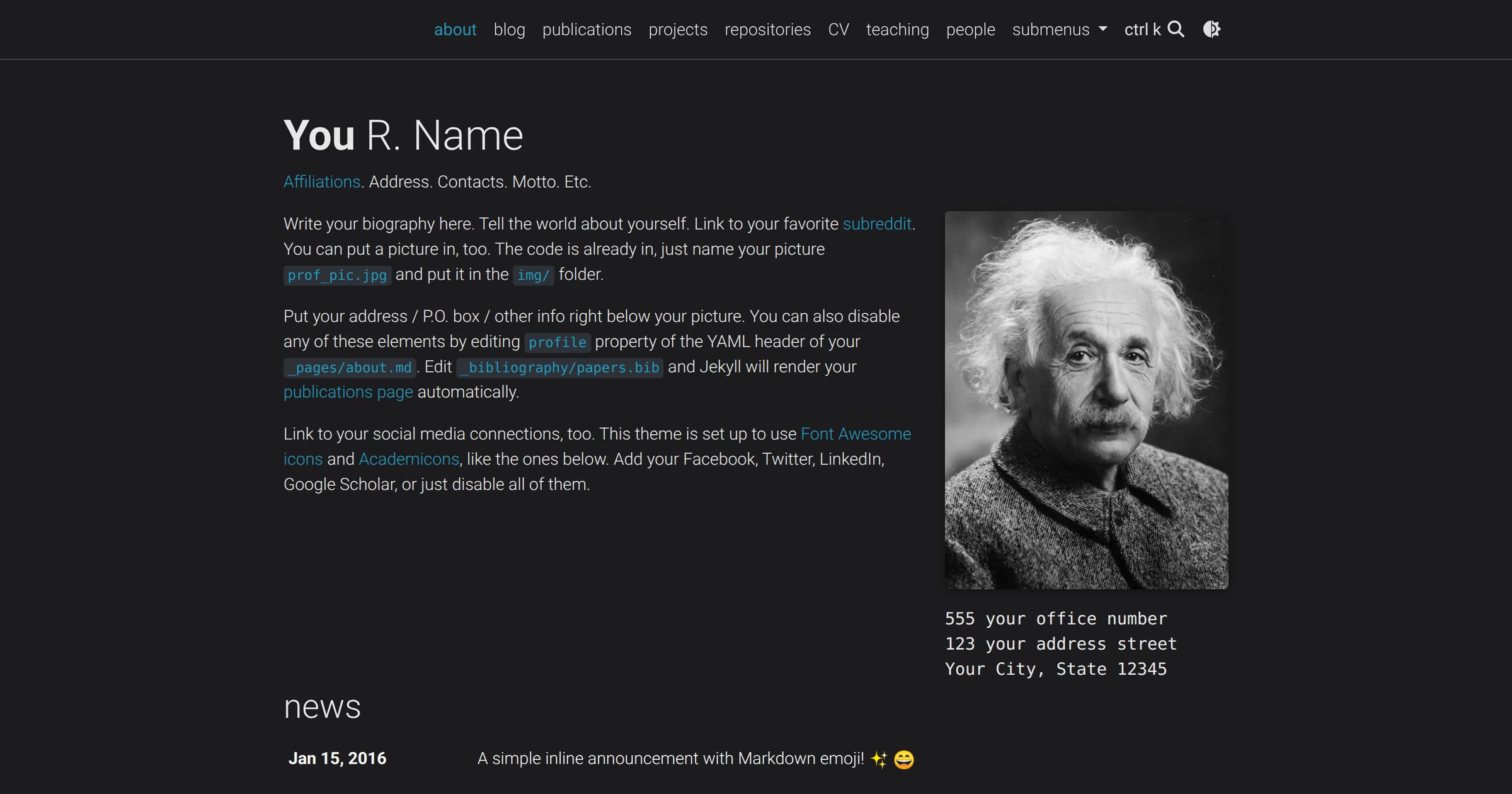
Jekyll starter for academic portfolios with BibTeX and CV pages.
Replaces Owlstown, Scilio
Who it's for
Al-folio's BibTeX integration lets you maintain one `.bib` file for both your LaTeX papers and your website, so updating your publications page is a git commit rather than a manual web edit. The CV page from `resume.json` or `cv.yml` follows the same pattern.
You need a site live quickly with no local setup. If you don't have a GitHub account or aren't comfortable with YAML configuration files, Owlstown or Scilio will get you live faster.
Beyond publications, al-folio supports a people page generated from a `_data` file, a projects collection, and custom collections for courses, talks, or workshops. GitHub repository cards and analytics plugins are available for researchers who want them.
You need a lab site with non-technical contributors who update content through a visual CMS. Al-folio has no visual editor; content updates require Markdown files or data file commits.
The blog supports Distill-style posts with side notes and hover citations, MathJax for LaTeX equations, TikZ diagrams, Plotly charts, and code syntax highlighting. Posts with these features render correctly on GitHub Pages without extra build infrastructure.
You just need a simple personal blog without academic portfolio features. A plain Jekyll or Hugo theme is simpler for writers who don't need publications pages or BibTeX integration.
The problem
Academic researchers need a portfolio site that stays current as their career evolves. Conference papers, preprints, and journal revisions accumulate faster than most researchers update their website. WordPress demands ongoing plugin maintenance, hand-coded HTML is fragile, and paid academic portfolio services charge monthly subscription fees tied to an entire academic career while locking publication data into proprietary formats. The specific friction is the publication list. Most researchers maintain a BibTeX file for their LaTeX manuscripts, but keeping a website's publications page in sync means manually duplicating entries or reformatting references for the web. Every new paper, every citation count update, every conference revision multiplies that work. The result is a publications page that perpetually lags the actual bibliography.
How it works
Renders a full publications page from your `.bib` file using jekyll-scholar. Add a new entry to your bibliography and the page updates on the next build. Supports citation counts, altmetric badges, and dimensions badges per publication.
Generates a formatted CV page from a `cv.yml` or `resume.json` file using the `al_folio_cv` plugin. No HTML editing needed; update the data file and the CV page rebuilds automatically.
Follows the visitor's system preference by default, with a toggle in the navbar that persists across visits. Implemented through the `al_folio_core` plugin with configurable theme color.
Blog posts support the distill.pub layout, MathJax and TikZ math rendering, syntax-highlighted code, Jupyter notebook embeds, image galleries, and Plotly/Mermaid charts via dedicated plugins.
In v1.x, al-folio ships as a thin starter with runtime features owned by separately versioned Ruby gems (al_folio_core, al_citations, al_math, and others). Pick up bug fixes and new features by bumping a gem version in your Gemfile instead of merging theme internals into your site.
Keyboard-shortcut search (Ctrl+K) across all site content, powered by the `al_search` plugin. Configured with a single `search_enabled` flag in `_config.yml`. No external search service required.
Features
- BibTeX-Driven Publications Page
- CV from YAML or JSON Resume
- Light and Dark Mode
- Research Blog with Distill Layout
- Plugin Ecosystem with Independent Versioning
- Full-Text Search
How to install
Self-hosting for local development uses Docker.
docker run -p 4000:4000 amirpourmand/al-folioRecommended for this setup
Strengths
- MIT License with No Subscription: MIT licensed and free to self-host permanently. GitHub Pages hosting is also free for public repositories, so the entire portfolio stack costs nothing beyond the domain name. Unlike Owlstown and Scilio, there is no monthly fee tied to your academic career timeline.
- BibTeX as the Single Source of Truth: Researchers who already manage references in BibTeX gain a publications page that updates automatically with every new entry. No duplicate data entry, no copy-paste from Google Scholar, no reformatting for the web.
- 16,000+ Stars and Active Maintenance: One of the most widely adopted academic portfolio starters on GitHub, with 4 listed maintainers and over 13,000 forks. The active commit history and fork count reflect adoption across academic departments and research groups worldwide.
- GitHub Pages Deployment via Actions: Includes a pre-configured deploy workflow that builds and publishes to GitHub Pages automatically on each push. No server infrastructure to manage, and GitHub Pages is free for public repositories.
Trade-offs
- Requires Git and Command-Line Setup: Al-folio is not a hosted service with a visual editor. Setting up the site requires using the GitHub template, editing YAML configuration files, and working with Jekyll's build system. Researchers with no Git or command-line experience will face a learning curve before the site is live.
- Local Development Needs Ruby or Docker: Previewing changes locally requires either a Ruby/Bundler environment or running the Docker image (`amirpourmand/al-folio`). Ruby version conflicts are a known friction point with Jekyll setups; the Docker path avoids them but adds a container runtime as a dependency.
- v1.x Plugin Architecture Requires Gem Version Management: In v1.x, runtime features moved from the starter itself into independently versioned Ruby gems. Your Gemfile pins multiple `al-` gem versions that need updating separately. Existing customized forks require a migration step to adopt the v1 plugin architecture before receiving new feature updates.
Tech stack
FAQ
Yes. GitHub Pages hosts public repositories for free, and al-folio includes a GitHub Actions workflow that builds and deploys the site automatically on each push. The only cost is a custom domain if you want one; the default GitHub Pages URL (`yourusername.github.io`) is free.
Not for deployment. GitHub Actions handles the production build on GitHub Pages. For local development and preview, you have two options: install Ruby with Bundler and run Jekyll locally, or use the Docker image (`amirpourmand/al-folio`) which packages the full build environment. The Docker path avoids Ruby version conflicts.
Add entries to your `_bibliography/papers.bib` file using standard BibTeX format and push the change. The jekyll-scholar plugin (included via `al_folio_core`) reads the `.bib` file and renders the publications page automatically. Citation counts and altmetric badges update on the next build if configured.
In v1.x it is a starter template, not a theme. The README describes it as a "thin starter, not a theme": runtime features are owned by independently versioned Ruby gem plugins rather than files in your site's repository. This means you pick up bug fixes and new features by bumping a gem version in your Gemfile instead of manually merging theme updates into your site.
Yes. The starter includes a people page generated from a `_data` file, project collection pages, and support for custom collections covering courses, talks, or workshops. Multiple contributors can commit Markdown and data files; the GitHub Actions workflow rebuilds and redeploys the site on every push.